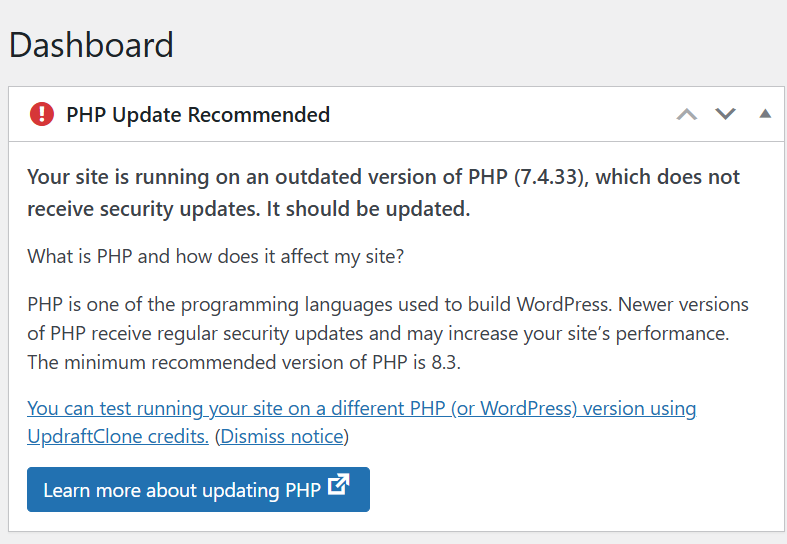
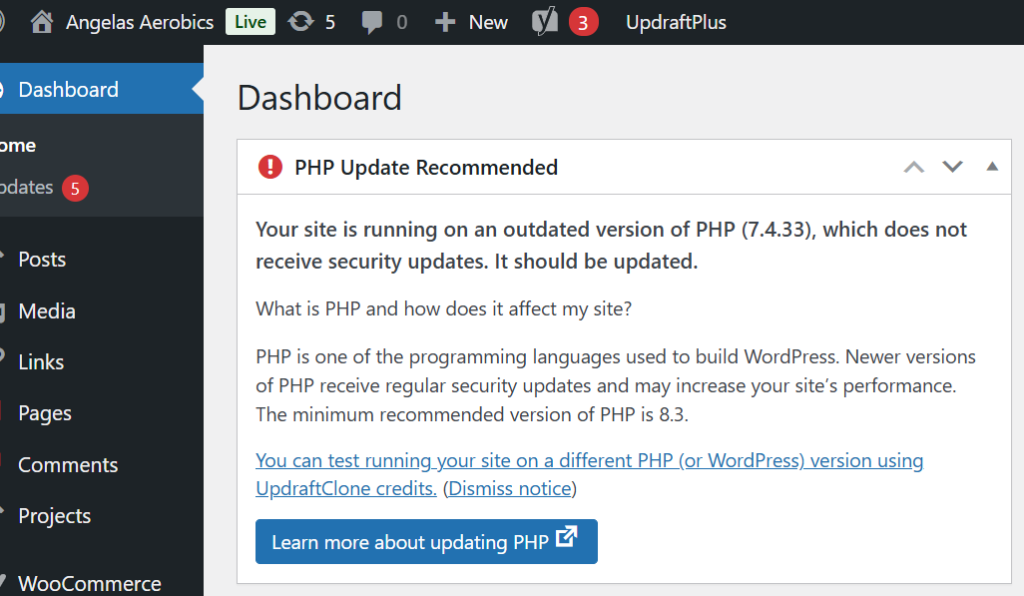
Have you ever come across a message about your website’s PHP version on your WordPress Dashboard and thought… what on earth is that? — you’re not alone.
Did you know that:
👉 It’s one of the most important parts of your website.
And if it’s not up to date, it can cause problems behind the scenes.
It’s the code that runs on your server and builds your website pages.
Every time someone visits your website, PHP is working in the background to:
Pull your content from the database
Run WordPress and your plugins
Process forms and user actions
Generate the page your visitor sees
All in a fraction of a second.
What Does PHP Stand For?
PHP originally stood for “Personal Home Page”.
These days, it’s officially known as a recursive acronym: 👉 “PHP: Hypertext Preprocessor”
(Yes… slightly confusing—but don’t worry, the name matters far less than what it actually does!)
It’s Essential for WordPress Websites
If your website is built on WordPress (like most of the sites I work on), PHP is absolutely essential.
It’s what allows your site to be dynamic, meaning you can:
Update your content easily
Add blog posts
Receive enquiries
Sell products
Manage memberships
Without PHP, your website simply wouldn’t function.
What Happens if PHP is Outdated?
This is where things can start to go wrong…
If your site is running an outdated version:
❌ It becomes less secure
❌ It can slow down
❌ Plugins and themes may stop working properly
❌ You increase the risk of errors or even site crashes
Many older websites are still running PHP 7.4, which is now end-of-life—meaning it no longer receives security updates.
Why Keeping PHP Updated Matters
Updating PHP is one of the simplest ways to improve your website’s:
✔ Speed
✔ Security
✔ Stability
✔ Compatibility with modern plugins
It’s not something your visitors will ever see… but it has a big impact on how your website performs.
A Real Example (From a Recent Client Migration)
When I recently migrated a client website for Angela’s Aerobics, the site was running on an outdated PHP version.
On the surface, everything looked fine…
But behind the scenes, it meant:
Increased security risk
Reduced performance
Potential compatibility issues
As part of the migration, I upgraded the site to PHP 8.4—bringing it up to date and ensuring it runs smoothly going forward.
What Version Should You Be Using?
Right now, the recommended version for most live websites is:
👉 PHP 8.4
It offers the best balance of:
Stability
Performance
Compatibility
How to Check Your PHP Version
If you’re curious, you can usually check your PHP version in:
Your hosting control panel
Your WordPress dashboard (Tools → Site Health)
If you’re unsure, it’s always worth asking your web designer or hosting provider.
Final Thoughts
PHP might not be something you think about…
But it plays a crucial role in keeping your website running properly.
Keeping it updated is one of those small, behind-the-scenes tasks that makes a big difference to your website’s health.
Need Help Checking Yours?
If you’re not sure what version your website is running—or you’ve seen warnings and don’t know what to do next—
👉 Get in touch and I’ll happily take a look for you.
Recently we carried out a WordPress website rescue after discovering a client’s site had been flooded with 2,229 spam blog posts.
Sometimes a job that looks simple on the surface turns out to reveal much more beneath.
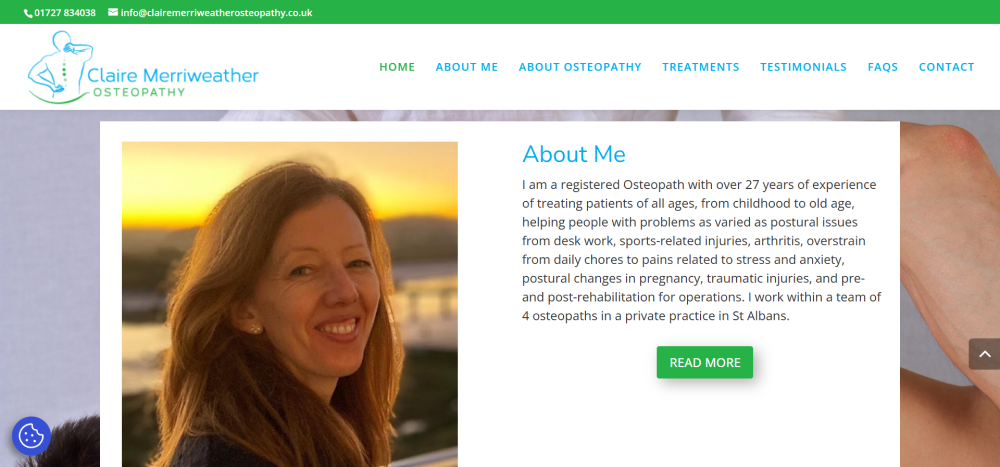
Recently, we were asked to quote for what should have been a straightforward project: migrating a client’s website to a new hosting environment. The client, Claire Merriweather of Claire Merriweather Osteopathy, had become unhappy with the level of service she was receiving from her existing web design company and felt she was paying over the odds for hosting without getting any real support in return.
Nothing unusual there.
However, when we logged into the website dashboard to take a look around, we discovered something rather surprising.
The blog section had been hacked.
And not just a little bit hacked.
A total of 2,229 spam posts had been added to the website.
At that point, what started as a simple migration quickly turned into something much more important: a full website rescue.
What We Discovered
Once inside the site, it became clear that the spam attack wasn’t the only issue. A closer look revealed several problems that had quietly developed over time.
The blog had been left open to spam attacks, which allowed automated bots to flood the website with thousands of junk posts. These posts served no purpose other than to damage the integrity of the site and potentially harm its search engine reputation.
Beyond the spam problem, there were several other issues affecting both usability and design:
The contact form was not functioning properly and displayed random symbols.
The testimonials page wasn’t displaying correctly, leaving large blank areas where reviews should have appeared.
The footer had never been properly designed and still contained the default Elegant Themes template content.
The homepage had not been correctly optimised for mobile devices, which meant visitors on phones were not seeing the best version of the site.
There was no “Back to Top” navigation button, making it harder for visitors to move around the page.
Important website essentials such as privacy policies and GDPR cookie preferences had not been implemented.
None of these issues alone would necessarily break a website. But together they created a site that was slowly becoming less effective, less secure, and more difficult for visitors to use.
Why We Recommended a Rebuild
With over two thousand spam posts embedded within the blog database, cleaning up the site would have been time-consuming and risky. Rather than attempting to patch an ageing setup, we recommended a clean rebuild of the website to the same design specifications as the original.
A rebuild allowed us to create a fresh, secure WordPress installation while preserving the look and feel that the client’s patients were already familiar with.
This approach ensured that the website would be stable, easier to manage, and protected against future spam attacks.
What We Fixed and Improved
During the rebuild process, we addressed both the technical issues and the usability improvements that had been missing from the original site.
Security and stability improvements
Removed all spam blog content
Installed preventative anti-spam protection to stop future attacks
Created a fresh, clean WordPress installation
Design and usability improvements
Designed a proper footer layout including contact details, opening hours and a Google Maps location link
Fixed the testimonials page so client reviews display correctly
Repaired the contact form so enquiries can be submitted without errors
Added a Back to Top button to improve navigation on longer pages
Increased the universal body text size to 16pt for better readability
Implemented a fixed header on mobile devices for easier navigation
Essential website additions
Added a Privacy Policy page
Installed a GDPR cookie preferences plugin
Connected the site to Google Site Kit
Implemented YOAST SEO to improve search engine visibility
From a visitor’s perspective, the website now looks very similar to the original version. But behind the scenes, it is now significantly more secure, easier to manage, and properly configured to support the business moving forward.
What This Story Tells Us About Many Websites
One thing we see quite often is that websites rarely fail in dramatic ways.
Instead, small issues quietly build up over time.
Plugins become outdated. Security gaps appear. Forms stop working. Design elements are left unfinished. Spam finds its way in.
And because these problems happen gradually, they often go unnoticed until someone finally takes a closer look inside the website dashboard.
This is why regular website maintenance, security checks and occasional updates are so important.
A Simple Website Health Check
If you run a business website, it’s worth asking yourself a few simple questions:
When was the last time you logged into your website dashboard?
Do you know where your website is hosted?
Is your contact form definitely working?
Are your plugins and security tools up to date?
Would you know if something had gone wrong behind the scenes?
These things are easy to overlook, especially when you’re busy running a business.
But as this story shows, a quick check can sometimes reveal issues that are well worth fixing.
If you would like a fresh pair of eyes on your website, we’re always happy to take a look and point out anything that might need attention.
Sometimes it’s just a small tweak.
And occasionally… it turns into a full website rescue.
Jacquie was a delight to work with! She arranged the transfer and tidy up of my website, liaising with my previous provider and making the whole process easy. She is friendly yet professional and I feel confident that she will do a great job in helping maintain my website in the future. Thank you! Claire Merriweather
A comprehensive rundown of key web design mistakes and how to fix them!
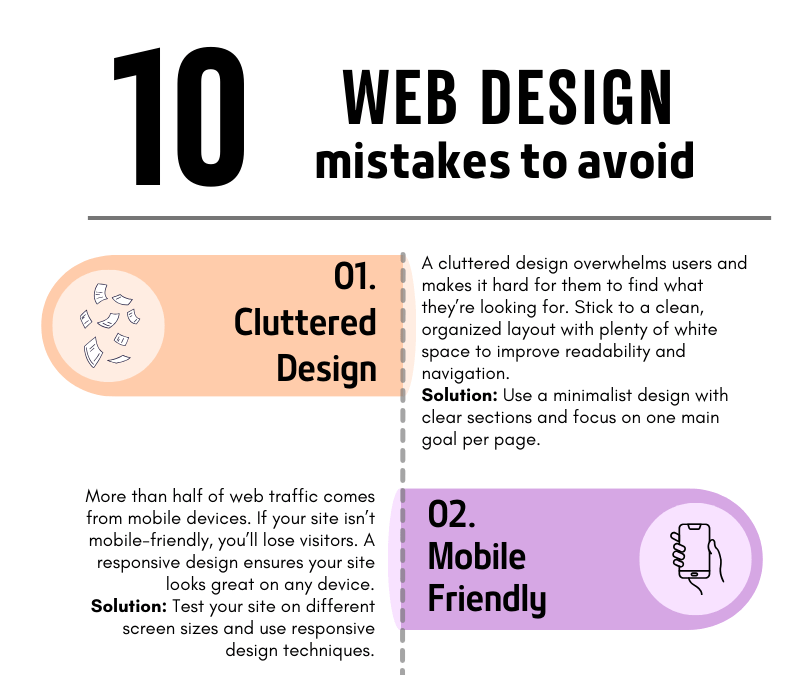
10 Common Web Design Mistakes to Avoid
Your website is often the first impression people get of your business. A poorly designed website can turn visitors away, but a well-thought-out design can convert visitors into customers. To help you build a site that stands out for all the right reasons, we’ve compiled a list of the 10 most common web design mistakes to avoid.
1. Cluttered Design
A cluttered design overwhelms users and makes navigation difficult. When visitors land on your site, they should be able to quickly find what they need without being bombarded with too much information. Less is often more!
How to fix it: Use plenty of white space, clear sections, and focus on one main goal per page. A clean and simple layout will make your site more user-friendly and visually appealing.
2. Not Mobile-Friendly
In today’s mobile-first world, having a website that doesn’t adapt to different screen sizes is a huge mistake. More than half of web traffic comes from mobile devices, so if your website isn’t responsive, you’re missing out on potential customers.
How to fix it: Test your site on various screen sizes, from mobile phones to tablets, and ensure it looks and functions well across all devices.
3. Slow Loading Speed
A slow website can frustrate visitors and drive them away before they even see your content. People expect websites to load quickly—ideally in under three seconds.
How to fix it: Compress large images, reduce the number of plugins, and use a fast, reliable hosting service. These steps can dramatically improve your site’s loading time.
4. Poor Navigation
If visitors can’t find what they’re looking for, they’ll leave. Your navigation should be simple, clear, and intuitive, helping users move around your site effortlessly.
How to fix it: Limit the number of menu items, use clear labels, and make sure every link works as expected. Always guide your visitors toward the most important content.
5. Ignoring SEO
You might have the best website in the world, but if no one can find it, it’s not doing its job. Search Engine Optimization (SEO) helps your site appear in search results, driving organic traffic.
How to fix it: Incorporate relevant keywords, create SEO-friendly titles and meta descriptions, and use image alt tags. This will help improve your rankings on search engines like Google.
6. Lack of a Clear Call-to-Action (CTA)
If your website doesn’t tell visitors what to do next, they’ll likely leave without taking action. A strong call-to-action guides users toward your goals—whether that’s signing up for a newsletter, making a purchase, or contacting you.
How to fix it: Place clear, bold CTAs on every page, encouraging users to take the next step. Be specific about what you want them to do.
7. Too Much Text
Long paragraphs and blocks of text can overwhelm readers. People scan web content quickly, so keep your text concise and to the point.
How to fix it: Break your content into smaller sections, use bullet points, and include images or icons to make the content more digestible.
8. Inconsistent Branding
Your website is an extension of your brand. If your colors, fonts, and tone of voice vary from page to page, it confuses users and makes your brand appear unprofessional.
How to fix it: Establish a brand style guide and ensure that your fonts, colors, and imagery are consistent across all pages.
9. Overuse of Pop-ups
Pop-ups can be helpful when used correctly, but too many—or ones that appear at the wrong time—can annoy visitors and cause them to leave your site.
How to fix it: Use pop-ups sparingly and ensure they don’t cover the main content too quickly. Only use them for important information, such as special offers or newsletter sign-ups.
10. Neglecting Website Maintenance
A website is never truly “finished.” Regular maintenance ensures your site stays secure, functional, and up to date. Neglecting updates can lead to broken links, security vulnerabilities, and an outdated user experience.
How to fix it: Schedule regular maintenance checks, update plugins, review content for relevancy, and ensure your site’s security is always up to par.
Final Thoughts
By avoiding these common web design mistakes, you’ll ensure that your website is not only visually appealing but also functional, easy to navigate, and optimized for both search engines and user experience. A well-designed site can make a world of difference in turning visitors into loyal customers!
If you’re ready to create a website that works for your business, avoid these pitfalls and set yourself up for success. And if you need help along the way, feel free to reach out!
In this digital age, where your business thrives online, the integrity and security of your website are paramount. Yet, despite advancements in technology, websites remain vulnerable to various threats ranging from cyberattacks to technical failures. Safeguarding your website through regular backups is not just advisable – it’s essential.
Why Backing Up Your Website Matters
1. Protection Against Cyber Threats: Cyberattacks, such as malware injections, ransomware, and Distributed Denial of Service (DDoS) attacks, pose significant risks to websites. A robust backup strategy ensures that even if your website falls victim to such attacks, you can quickly restore it to a previous, uncorrupted state.
2. Minimise Downtime: Website downtime can result from server crashes, software updates gone wrong, or human error. By maintaining up-to-date backups, you can swiftly recover your website, minimising downtime and preventing potential revenue loss.
3. Content Integrity: Your website’s content represents your brand and communicates your message to the world. Regular backups ensure that your valuable content, including blog posts, product listings, and multimedia files, remains intact in the event of accidental deletion or corruption.
Implementing a Backup Strategy
1. Choose the Right Backup Solution: Select a backup solution that aligns with your website’s platform (e.g., WordPress, Joomla, Shopify) and hosting environment. Options range from manual backups performed through your hosting provider’s control panel to automated solutions offered by third-party services.
2. Establish a Backup Schedule: Define a regular backup schedule based on the frequency of updates to your website’s content and the criticality of your data. Daily or weekly backups are common for dynamic websites with frequent content changes, while static websites may suffice with less frequent backups.
3. Store Backups Offsite: Storing backups offsite, preferably in a secure cloud storage service or on a separate server, mitigates the risk of data loss due to server failures or physical disasters. Ensure that your chosen storage solution provides adequate security measures, such as encryption and access controls.
4. Test Backup and Recovery Procedures: Periodically test your backup and recovery procedures to verify their effectiveness. Simulate scenarios such as restoring a backup to a new server or recovering specific files to ensure that you can confidently recover your website in case of emergencies.
Backing up your website is not a luxury but a necessity in today’s digital landscape. By prioritising website backups, you protect your online presence, maintain business continuity, and uphold the trust of your audience. Remember, investing time and resources in a comprehensive backup strategy today can save you from costly disruptions tomorrow. Stay proactive, stay secure, and safeguard your digital assets with regular website backups. All our own hosted websites are backed up each month to our remote Cloud Storage System as part of our Maintenance Plan.If you’re unsure as to whether you have a Backup Plan contact your Web Hosting Company or Web Designer.
One of the biggest questions I’m asked when creating websites is what is ongoing post launch After Care?
Find out by reading my report below…
Hosting & Plugins
All websites must be hosted somewhere, they can’t just float around the ethernet aimlessly. Think of a server as a vessel which holds your website and keeps it safe. This container protects your website from intruders and keeps your website fully operational.
All Fiit Marketing websites consist of the following essentials which I install before I even start to build your site:
Divi Licence (more about that later)
WordFence (to protect it from hacking)
Yoast (for basic SEO functionality.
SSL Licence (keeps your internet connection secure. It’s the padlock at the top lhs of any website)
There are a few other plugins which are added to make your website not only look nice, but helps with the functionality and operation of your site.
Then there are the E-Commerce and Membership Plugins (WooCommerce / WP Simple Membership) for the websites which have shops and online memberships, and if you want to work on your Google stats I recommend installing Google Site Kit.
All of the plugins and the Divi theme require regular updates. The software developers who make the plugins are constantly updating the software, quite often on a weekly basis. These updates aren’t automatically carried out on your website as it requires your web developer (me) to go in and carry out the updates.
If plugin and theme updates aren’t carried out on your website then things can slow down and the site starts to develop problems such as pages not loading, menus not displaying, images disappearing…
Divi Theme
All Fiit Marketing websites are built using the Divi Theme Builder. As a designer it gives me the scope and technical functionality to be able to create not only highly visual websites, but which perform well on the world wide web. I had previously worked with a few other themes (Themify / WP Bakery) for a few years before making the switch to Divi and I’ve never looked back. Your website has its own individual API code under my global licence.
So as you can see, there is a lot going on with a website, which is why it needs after care.
Do I need to stay with Fiit Marketing post site launch?
If you are confident with managing your website there is absolutely no problem to move your website to a server company of your choosing after your site is completed and fully paid up. There are many companies out there and I can help you to make the transition.
You would need to purchase your own Divi Licence as you would no longer be entitled to the API key under my licence (c.£75+VAT per annum).
Sample Hosting Companies* and associated costs (excluding VAT):
WP Engine £19/mth
Siteground £11.99
Cloudways £10
Bluehost £7.50 (3 year term)
*above costs are for website which has no E-Commerce / Membership
What are the Fiit Marketing After Care Plans?
Plan A £15/mth
Continued hosting on our shared server
Premium Divi Theme Licence
Secure off site backups
Plugin Updates
Continued SSL Licence
Security and Malware Scans
Plan A+ £25/mth
Everything included in Plan A PLUS…
Annual Domain Name Renewal (if your domain name was purchased on your behalf by Fiit Marketing)
Up to 30 mins FREE design/alts each month (value £30)
NB: Doesn’t carry over to the next month if not used!
If you are a complete beginner, don’t want to hire a Web Designer and want a quick and easy way to get your website up and running then Wix is the perfect solution for you.
Although Wix offers a basic website builder service for free it does have some drawbacks…
Wix branded advertisements on the header and footer of your website
You can’t use a Custom Domain name for your website so it will appear as
username.wix.com/sitename
There is no SEO or E-Commerce functionality
If you want to remove the advertisements and get additional features you’ll need to upgrade to one of the Wix Premium Plans.
WordPress
A WordPress website will give you complete control of every aspect of your website.
You have the flexibility to build an E-Commerce Store, run a Blog or start a Membership Site, plus you have access to over 58,000 Plugins.
Apps and Plugins
Wix calls them Apps and WordPress calls them Plugins. Some are free and some require a monthly subscription payment.
What are they?
These are lovely addons which you can bolt onto your website. They’re an essential part of building and creating an amazing website.
There are Apps / Plugins to boost your sites speed and performance, improve SEO, add contact forms, sell online courses. Some are free and some require additional monthly or annual subscription payment.
Your Fiit Marketing Website comes with additional features such as animated text, flip picture boxes, image hover boxes, and links to your Social Media.
Domain Name and Hosting
With a WordPress website you’ll need your own Domain Name and Hosting Service. At Fiit Marketing we can help you to find and purchase your own Domain Name. All our websites are hosted on our Shared Server account with Bluehost. If you want to add an E-Commerce functionality WooCommerce can easily be bolted on which gives you the ability to start selling products directly from your website. With a WordPress website you can backup your website, download your media files. You can even move your website to a new hosting company and designer. Wix makes it a little harder to move your website and files to a new hosting company so if you want a WordPress site it’s sometimes easier to walk away from Wix and start afresh.
Blogging
If you’re looking at writing a Blog, WordPress wins hands down. It started as a blogging platform and now is used on 40% of all websites.
Themes
This is the most important part of your website – how the design and layout look and work.
Your website must be user friendly, easy to navigate and especially needs to be functional across all platforms – mobile, laptop, tablet.
Wix comes with over 900+ website themes. However the drawback is that once you have selected your theme you can’t switch to another template. You can change the colours and layouts but not the overall look of your website.
Imagine wearing the same clothes day in and day out and not being able to change them?
A WordPress site allows you to easily change the look and feel of your website whenever you feel like having a refresh.
As your business grows and develops your website needs to reflect this and grow with you.
Cost
Over time Wix is the more expensive option.
At Fiit Marketing we have created transparent website costs, monthly payment plans and ongoing hosting options once your website is completed. You can come back to us to add more features to your site whenever you’re ready and we are always here to help.
Summary
We can get your new WordPress or Wix website up and running in no time at all.
If you have a Wix website, we can help you to update your site – but not give you a new theme – and we can add on additional Apps for you.