Adding a membership area to your website can be an exciting way to create recurring revenue, build a loyal community, and share your expertise. But before you dive in, you need to know that it’s important to ask the right questions (to yourself and your web designer) to ensure a smooth and sustainable setup.
How much time a week can you commit?
What pricing model makes sense for your business?
Which payment platform will you use? Stripe? PayPal etc…
In this blog post, I’ll walk you through 29 key questionsyou need to ask to help you plan your membership site the right way so you can launch with confidence and avoid costly mistakes.
Here are a few benefits of having an online membership:
Recurring Revenue – Instead of relying on one-off sales, a membership model can provide consistent, predictable income, helping you scale your business sustainably.
Builds a Loyal Community – Memberships create a sense of exclusivity and connection, fostering stronger relationships with your audience and increasing customer retention.
Showcases Your Expertise – A membership allows you to position yourself as an authority in your field by consistently delivering valuable content and insights.
Scalable & Flexible Income – Once your content is created, it can be accessed by unlimited members without additional effort, making it a time-efficient way to grow your business.
Encourages Deeper Engagement – With exclusive content, live Q&As, or community forums, members are more likely to interact with your brand, increasing their trust and long-term commitment.
Adds More Value to Your Business – A well-structured membership can increase the perceived value of your services, making it easier to upsell premium offerings or courses.
Here are my 29 Key Questions You Need To Ask…
Content & Commitment
How much time can I realistically dedicate each week to updating content and engaging with members?
What type of content will I provide (videos, articles, live sessions, community forums, downloads)?
How often will I add new content, and do I have a plan for content creation in advance?
Do I have enough existing content to launch, or do I need to create more before starting?
Will I offer live sessions, and if so, how will they be scheduled and delivered?
Membership Structure & Pricing
What will my membership structure look like (single-tier, multiple tiers, one-time payment, subscription)?
Will I offer a free trial, discounted first month, or a pay-per-class option?
What price point will be attractive to my ideal members while ensuring sustainability for my business?
Will there be a cancellation policy, and how will I manage refunds or disputes?
Do I have a plan for increasing prices or introducing new membership levels over time?
Payment & Transactions
Which payment platform will I use (PayPal, Stripe, GoCardless, direct bank transfers, or another)?
Do I need the ability to accept multiple currencies or international payments?
Will I allow one-time payments, recurring subscriptions, or both?
How will I handle failed payments and expired memberships?
Do I need to charge VAT or sales tax, and how will I manage tax compliance?
User Experience & Management
How easy will it be for members to navigate the membership area and access their content?
Am I comfortable managing the members’ dashboard and troubleshooting common issues?
Will I provide customer support, and how will members contact me for help?
Do I need automation tools (e.g., drip content, email reminders, progress tracking) to enhance the experience?
Will I allow members to interact (forums, comments, messaging), and how will I moderate discussions?
Tech & Security
What platform will I use to host the membership area (WordPress with a plugin, Wix, Shopify, third-party services)?
How will I protect my content from unauthorized sharing or downloads?
Do I need integrations with email marketing, payment processors, or scheduling tools?
What data protection measures do I need to consider (GDPR compliance, secure logins, member privacy)?
Growth & Retention
How will I attract new members (SEO, social media, paid ads, partnerships, lead magnets)?
What strategies will I use to keep members engaged and prevent cancellations?
Will I offer incentives, challenges, or exclusive perks to encourage long-term membership?
How will I collect and respond to member feedback to improve the experience?
Do I have a long-term vision for scaling the membership (more content, community features, collaborations)?
Thinking about adding a membership area to your website? Let’s make sure you get it right! Whether you need help choosing the right platform, structuring your content, or setting up payments, I’ve got you covered. Get in touch today and let’s build a membership site that works for your business!
Have you ever wondered why some website visitors seem to just…disappear? They’re browsing, they’re interested, but then – whoosh! They’re gone. If you’re not using clear calls to action (CTAs) on your site, you’re likely missing out on potential clients and valuable email sign-ups. Here’s why a good CTA is so important and how it can help you capture those visitors before they click away.
What’s a CTA, Anyway?
A Call to Action (CTA) is just a little nudge in the right direction. Think of it as an invitation for your visitors to take the next step – whether that’s signing up for your newsletter, grabbing a free resource, or booking a call. It’s as simple as adding a button that says “Join Us” or “Get Started.”
1. CTAs Keep Visitors Engaged and Interested
Without a CTA, people might enjoy what they see, but they’re left without a clue about what to do next. By adding a CTA, you’re making it easy for them to keep the conversation going. Something like “Get Our Free Checklist” or “Start Your Free Trial” gives them a clear path forward, keeping them engaged and on your site a little longer.
2. Catch Their Email Before They Leave
Not everyone’s ready to buy or book on the spot. That’s okay! A solid CTA can help you grab their email address so you can stay connected. Maybe they’re just browsing today, but with a little follow-up (like a helpful email or two), they could be ready to work with you down the road. A CTA that offers something free, like “Download Your Free Guide” or “Sign Up for Tips,” is often all it takes to keep the door open.
3. Building Your Email List = Building Your Future
Email lists aren’t just for big companies; they’re one of the most valuable assets for any business. Think of it this way: when someone joins your email list, they’re telling you, “Hey, I’m interested!” That’s huge! Through regular emails, you can share useful info, exclusive offers, and even just friendly updates – keeping you top of mind for when they’re ready to become a client.
4. Guides Your Visitors Through Your Site Like a Pro
Ever been to a site and just…wandered around with no clear direction? That’s what happens without good CTAs! They act like guideposts, helping visitors navigate your site without getting lost. If they’re on your homepage, you can guide them to check out your blog, explore your services, or even sign up for a freebie. It all makes for a smoother, more enjoyable experience.
5. CTAs Build Trust and Show You Care
Great CTAs show you understand what your audience wants. A CTA that says, “Get Free Tips to Boost Your Business,” tells visitors you’re here to help them succeed, not just sell to them. Thoughtful CTAs show your visitors that you’re interested in giving them real value, and that’s key for building trust.
Here Are Some Quick Tips for Crafting Killer CTAs:
Be Clear and Direct: Don’t be shy! Phrases like “Get Your Free Resource” or “Book a Call” work because they’re straightforward.
Use Eye-Catching Colors: Your CTA should pop right off the page to grab attention.
Keep It Relevant: Tailor CTAs to each page’s content. For example, on your services page, a “Schedule a Free Consultation” button might be perfect.
Offer Something of Value: Think about what your audience would love – a checklist, a guide, a free consultation – and make that your CTA.
Ready to Capture Those Leads? Join My MailerLite Workshop!
If you’re looking to add powerful CTAs and start building an email list that actually works, join my upcoming MailerLite Workshop! I’ll show you exactly how to create engaging sign-ups, automate emails, and build a list of potential clients who want to hear from you. This is perfect for entrepreneurs who want to make sure no potential lead slips away. Let’s set up your site for success and turn those visitors into real clients!
If you’ve ever found yourself saying things like, “Make it pop!” or “I’ll know it when I see it,” you’re not alone! But here’s the thing – these phrases are more likely to make your designer scratch their head than spark creativity.
Don’t worry; I get it. Knowing exactly what you want (and how to communicate it) can be challenging. That’s why I’m here to break down the art of the perfect designer brief – making it easier for you to get exactly what you want and for us to make it happen. Let’s dive in!…
Step 1: Start with Your Audience
Who’s this website for? Instead of saying, “I want it to look cool,” think about who will visit your site. Are they tech-savvy millennials? Busy moms? Entrepreneurs? Knowing your target audience will help shape the website’s style and tone. A designer can work magic with audience insights!
Pro Tip: Share specific details, like “My audience is entrepreneurs in their 30s looking for quick, impactful advice.”
Step 2: Be Real with Your Vision
The best web design isn’t about “just a vibe”; it’s about purpose. Imagine how you want visitors to feel and act on your site. Do you want them to sign up, feel inspired, or maybe explore your offerings? By giving your designer a feel for the action and emotion you want to inspire, they can create a visual experience to match. More on this and my upcoming Mailerlite workshop in my next newsletter!
Step 3: Colors and Fonts? Yes, They Matter!
Here’s a fun one: Color and font choices aren’t just preferences – they’re about brand personality! If you’re unsure, start by telling your designer how you want your brand to feel. Is it bold and energetic? Calm and sophisticated? Sharing websites you admire or pointing out specific colors that resonate with you helps a ton.
Pro Tip: Avoid Comic Sans. Just… trust me on this one.
Step 4: Bring Examples You Like
Designers love examples. It’s like giving us a map to your happy place! Websites, color palettes, layouts – anything visual that catches your eye can serve as an inspiration guide. Just remember, it’s not about copying; it’s about capturing that spark of inspiration and making it uniquely yours.
Step 5: Streamline Feedback
You might think, “A little tweak here, one more tweak there…” but soon you’re knee-deep in revision overload! To keep the process smooth, gather feedback all at once and communicate changes clearly. This saves time, money, and sanity for both you and your designer. Trust me, your dream website is just around the corner!
Ready to build your dream site?
With these tips, you’re well on your way to making it happen – without the “make it pop!” confusion. When you’re ready for the next step, I’m here to help bring your vision to life, loud and clear.
When was the last time you gave your website a serious look? If your answer is “a while ago” or “I can’t remember,” it might be time for a website makeover. Like your wardrobe or your home decor, your website needs refreshing now and then. But how do you know when it’s the right time? Here are some telltale signs that your website could use a revamp.
1. Your Design Looks Outdated
Trends in web design move fast, and what looked great five years ago can feel outdated now. If your site is starting to look outdated, it’s time for a refresh.
Ask yourself:
Does your design feel cluttered or old-fashioned?
Are the fonts and colors up-to-date and aligned with current trends?
Is your layout easy to navigate, or do users get frustrated trying to find what they need?
An outdated design not only affects your credibility but also how long visitors stay on your site. A fresh, modern look can make a huge difference in how people perceive your business.
2. Your Content Feels Stale
Websites are living, breathing things. If the content on your site hasn’t been updated in a while, it’s probably time to give it some love.
Signs your content needs a refresh:
You’re still showcasing old products or services you no longer offer.
Your blog hasn’t seen a new post in months (or years!).
The language on your site doesn’t reflect your current brand voice or business direction.
Refreshing your content – whether it’s rewriting your about page, adding a blog post, or updating your service descriptions – can breathe new life into your website.
3. It’s Not Mobile-Friendly
If your website doesn’t look good on mobile devices, you’re definitely overdue for a makeover. With more people browsing on their phones than ever before, having a mobile-friendly website is crucial.
Check your mobile responsiveness:
Is your website easy to navigate on a phone or tablet?
Do images load properly, and is text easy to read without zooming in?
Are buttons and links big enough to tap?
If your site isn’t optimised for mobile, you’re likely losing visitors – and potential customers – before they even have a chance to explore what you offer.
4. Your Site is Slow
A slow website is one of the fastest ways to turn visitors away. If your pages take too long to load, people are more likely to hit the “back” button and move on to your competitors.
Test your site speed:
Does it take more than a couple of seconds for your pages to load?
Are images or videos slowing things down?
A site that loads quickly provides a better user experience and is more likely to rank higher on search engines, giving you an edge over the competition.
5. Your Branding Has Changed
If your business has evolved but your website hasn’t caught up, it’s time for a makeover. Your website should be a true reflection of your brand today, not where you were five years ago.
Ask yourself:
Have you updated your logo, colors, or fonts recently?
Are your website images and messaging aligned with your current target audience?
Does your website still reflect your core values and business goals?
Consistency across all platforms is key. Your website should align with your social media, marketing materials, and overall brand identity.
6. You’re Embarrassed to Share It
Let’s be honest—if you find yourself hesitant to give out your website link, it’s a pretty clear sign that you need a makeover. Your website should be something you’re proud to show off, whether it’s to clients, collaborators, or anyone interested in what you do.
If you’re not eager to share it because it feels outdated, slow, or unprofessional, it’s time for a revamp that makes you excited to spread the word.
7. Your Conversions Are Dropping
If your website traffic is steady but conversions are falling, your site might not be doing its job. Whether you’re trying to get visitors to fill out a form, sign up for a newsletter, or make a purchase, the design and user experience should be optimised for those goals.
Consider the following:
Are call-to-action buttons easy to find and compelling?
Is your checkout process or contact form straightforward and user-friendly?
Are visitors finding what they need quickly, or do they get lost along the way?
Improving these aspects can help you turn visitors into customers and boost your bottom line.
Your website is often the first point of contact between you and your customers, and it needs to represent your business in the best light possible. If any of these signs ring true, it’s time to consider a makeover. With a refreshed design, updated content, and better functionality, your site can work harder for you and help take your business to the next level.
Are You Ready for a Website Makeover? Let’s Make It Happen!
Your website should be working for your business, not holding it back. If you’re seeing the signs that it’s time for a refresh, don’t wait any longer! A modern, fast, and mobile-friendly website will help you stand out, attract more clients, and grow your business.
Let’s chat about how we can transform your website into something you’re proud to share. Whether you need a few tweaks or a full redesign, I’ll guide you every step of the way.
Get in touch to schedule a free chat and let’s get started!
A comprehensive rundown of key web design mistakes and how to fix them!
10 Common Web Design Mistakes to Avoid
Your website is often the first impression people get of your business. A poorly designed website can turn visitors away, but a well-thought-out design can convert visitors into customers. To help you build a site that stands out for all the right reasons, we’ve compiled a list of the 10 most common web design mistakes to avoid.
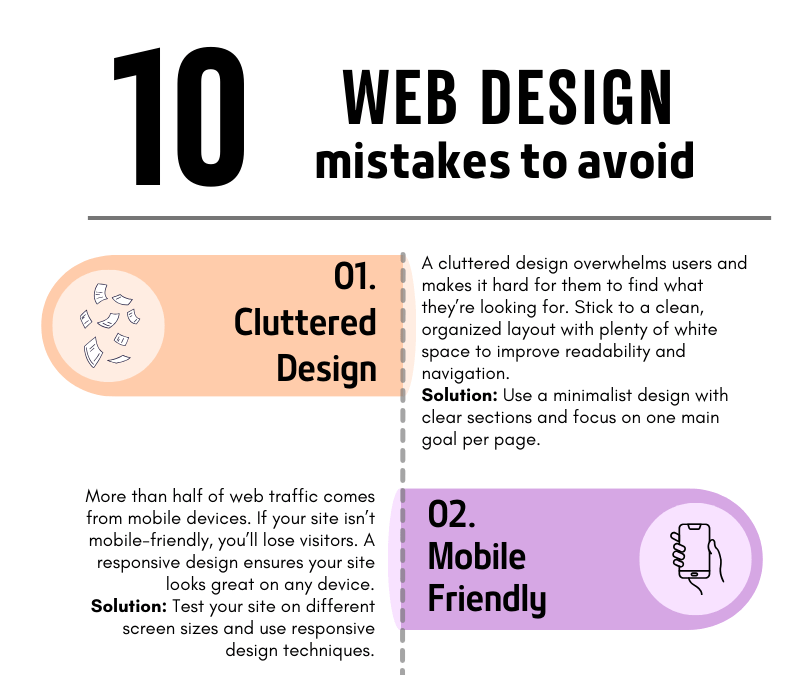
1. Cluttered Design
A cluttered design overwhelms users and makes navigation difficult. When visitors land on your site, they should be able to quickly find what they need without being bombarded with too much information. Less is often more!
How to fix it: Use plenty of white space, clear sections, and focus on one main goal per page. A clean and simple layout will make your site more user-friendly and visually appealing.
2. Not Mobile-Friendly
In today’s mobile-first world, having a website that doesn’t adapt to different screen sizes is a huge mistake. More than half of web traffic comes from mobile devices, so if your website isn’t responsive, you’re missing out on potential customers.
How to fix it: Test your site on various screen sizes, from mobile phones to tablets, and ensure it looks and functions well across all devices.
3. Slow Loading Speed
A slow website can frustrate visitors and drive them away before they even see your content. People expect websites to load quickly—ideally in under three seconds.
How to fix it: Compress large images, reduce the number of plugins, and use a fast, reliable hosting service. These steps can dramatically improve your site’s loading time.
4. Poor Navigation
If visitors can’t find what they’re looking for, they’ll leave. Your navigation should be simple, clear, and intuitive, helping users move around your site effortlessly.
How to fix it: Limit the number of menu items, use clear labels, and make sure every link works as expected. Always guide your visitors toward the most important content.
5. Ignoring SEO
You might have the best website in the world, but if no one can find it, it’s not doing its job. Search Engine Optimization (SEO) helps your site appear in search results, driving organic traffic.
How to fix it: Incorporate relevant keywords, create SEO-friendly titles and meta descriptions, and use image alt tags. This will help improve your rankings on search engines like Google.
6. Lack of a Clear Call-to-Action (CTA)
If your website doesn’t tell visitors what to do next, they’ll likely leave without taking action. A strong call-to-action guides users toward your goals—whether that’s signing up for a newsletter, making a purchase, or contacting you.
How to fix it: Place clear, bold CTAs on every page, encouraging users to take the next step. Be specific about what you want them to do.
7. Too Much Text
Long paragraphs and blocks of text can overwhelm readers. People scan web content quickly, so keep your text concise and to the point.
How to fix it: Break your content into smaller sections, use bullet points, and include images or icons to make the content more digestible.
8. Inconsistent Branding
Your website is an extension of your brand. If your colors, fonts, and tone of voice vary from page to page, it confuses users and makes your brand appear unprofessional.
How to fix it: Establish a brand style guide and ensure that your fonts, colors, and imagery are consistent across all pages.
9. Overuse of Pop-ups
Pop-ups can be helpful when used correctly, but too many—or ones that appear at the wrong time—can annoy visitors and cause them to leave your site.
How to fix it: Use pop-ups sparingly and ensure they don’t cover the main content too quickly. Only use them for important information, such as special offers or newsletter sign-ups.
10. Neglecting Website Maintenance
A website is never truly “finished.” Regular maintenance ensures your site stays secure, functional, and up to date. Neglecting updates can lead to broken links, security vulnerabilities, and an outdated user experience.
How to fix it: Schedule regular maintenance checks, update plugins, review content for relevancy, and ensure your site’s security is always up to par.
Final Thoughts
By avoiding these common web design mistakes, you’ll ensure that your website is not only visually appealing but also functional, easy to navigate, and optimized for both search engines and user experience. A well-designed site can make a world of difference in turning visitors into loyal customers!
If you’re ready to create a website that works for your business, avoid these pitfalls and set yourself up for success. And if you need help along the way, feel free to reach out!
A Deep Dive Into The Key Differences Between A Website and an App…
Businesses are increasingly turning to online platforms to reach their audiences. As a result, the debate between websites and apps has become more prominent.
Both serve unique purposes and can significantly enhance your online digital presence, but they are fundamentally different in terms of functionality, user experience, and development.
Our 7 point deep dive explains the differences…
1. Definition and Purpose Website: A website is a collection of interlinked web pages hosted on a web server, accessible through the internet using a web browser. Websites are designed to provide information, showcase products, share content, and offer services to users. They are typically static or dynamic in nature and can be accessed on any device with a web browser. App: An application (app) is a software program designed to perform specific tasks or functions directly on a user’s device. Apps can be divided into three main categories: mobile apps, desktop apps, and web apps. Mobile apps are specifically designed for smartphones and tablets, while desktop apps are for computers. Web apps operate within a web browser but offer a more app-like experience.
2. Accessibility Website: Websites are universally accessible from any device with an internet connection and a web browser. Users simply type in the URL or click on a link to visit the site. This ease of access makes websites ideal for reaching a broad audience. App: Apps need to be downloaded and installed from app stores (such as Google Play Store or Apple App Store) or other platforms. This requirement can limit initial accessibility, but once installed, apps often provide a more personalised and optimized user experience.
3. User Experience Website: Websites provide a consistent experience across different devices since they are designed to be responsive. Modern web design practices ensure that websites adapt to various screen sizes and resolutions, offering a seamless experience whether accessed from a desktop, tablet, or smartphone. App: Apps are designed to leverage the native features of the device they are installed on, such as the camera, GPS, and touch gestures. This integration allows for a more intuitive and engaging user experience. Mobile apps, in particular, can provide faster performance and offline capabilities, which websites typically cannot.
4. Development and Maintenance Website: Developing a website generally involves using web technologies like HTML, CSS, and JavaScript. Content management systems (CMS) like WordPress, Wix, and Squarespace make it easier to build and maintain websites without extensive coding knowledge. Updates and maintenance are done on the server side, making it easier to deploy changes universally. App: App development is more complex and typically requires knowledge of specific programming languages and development environments. For instance, developing a native mobile app for iOS requires Swift or Objective-C, while Android apps require Java or Kotlin. Apps also need to be regularly updated and maintained through the respective app stores, which involves more rigorous processes compared to websites.
5. Cost and Time Website: Building a website is generally less expensive and time-consuming than developing an app. Tools and templates available on platforms like WordPress can significantly reduce costs and development time. App: App development can be costly and time-intensive, especially if you’re developing separate versions for different operating systems (iOS and Android). The need for ongoing updates, bug fixes, and compatibility with new devices and OS versions further adds to the cost.
6. Searchability and Reach Website: Websites are indexed by search engines like Google, making them easily searchable and discoverable. This searchability is crucial for attracting organic traffic and reaching a wider audience through search engine optimization (SEO). App: Apps are primarily found through app store searches, advertising, and word-of-mouth. While app store optimisation (ASO) can help improve discoverability, apps generally have a more limited reach compared to websites unless they gain significant popularity.
7. Usage and Engagement Website: Websites are ideal for providing information, sharing content, and offering services that don’t require extensive user interaction. They are well-suited for businesses looking to establish an online presence and reach a broad audience. App: Apps excel in scenarios where user engagement, personalization, and interaction are key. They are perfect for services that benefit from push notifications, offline access, and integration with device hardware. Apps can also foster higher user retention and engagement through tailored experiences.
CONCLUSION
Choosing between a Website and an App depends on your specific goals, audience, and resources. If your aim is to reach a broad audience and provide accessible information, a website might be the best option. On the other hand, if you seek to offer a highly interactive and personalised experience, investing in an App could be more beneficial.Both websites and apps have unique advantages and can complement each other when used strategically. Understanding their differences and potential can help you make an informed decision and effectively leverage digital tools to achieve your objectives.
We’ve teamed with the people at Passion.io to give you a 14 Day FREE Trial!
What you get: * Full access to Passio.io * Expert Unleashed ChallengePersonalised Onboarding Calls
After your FREE Trial you can opt to try Passion.io for a full 30 days. Use it to create your own stunning app and launch it to the world.If at any time during those 30 days you change your mind, and you’ll get a full refund.