It’s so easy to grab a picture online and pop it onto your website. But recently one of my clients received a copyright claim for using an image that wasn’t properly licensed.
Copyright compliance is serious business. Companies like Immediate Mediaand Image Professionalsactively monitor websites to catch unlicensed image use. Even if the image was added by a designer, a template, or a blog contributor — you (the website owner) are the one legally responsible.
Here’s how to stay safe:
✅ Only use properly licensed images — from trusted sources such as Canva, Shutterstock, iStock, Pexels, or your own photography. ✅ Double-check “free” sites — not all free image libraries allow commercial use. Always read the licence terms. ✅ Keep proof of your licences — save receipts, invoices, or screenshots of where the image was sourced. ✅ Avoid Google Images entirely — it’s not a stock library, even if it looks like one! ✅ Limit image file size — for website performance, never upload images larger than 1MB. Large images slow down your site and can even affect Google rankings. Compress images before uploading while keeping them sharp and clear. ✅ If you’re unsure — ask me. I can help you check whether your site’s images are compliant.
A quick tip…
If you had your website built years ago or you’ve added images over time, it’s worth doing a quick audit now. Removing or replacing unlicensed images could save you hundreds of pounds later.
Need help?…
If you’d like me to review your site’s image use or show you where to find safe, high-quality visuals, just reply to this email. It’s an easy fix that can prevent a costly headache.
Download our FREE Guide on how to correctly format your images for your website.
From large banners to small thumbnails, using the correct dimensions and formats will avoid blurry images, slow load times, messy layouts and an overloaded website and server! Once you’ve selected your images for your website you need this guide.
If you’re a small business owner or entrepreneur trying to get your website up and running, I know how overwhelming it can feel. There’s so much to think about—from layout and branding to lead magnets and SEO—and Googling every step can be a total time suck.
That’s exactly why I’ve put together a collection of free downloadable guides, created to help you cut through the confusion and start building a site you’re proud to share.
What You’ll Find in the Freebies Section: Here’s a sneak peek at what’s inside:
Website Starter Toolkit – Know what you need before you build
✅ How To Brief Your Web Designer
✅ How To Create Your First Blog
✅ How To Password Protect A Page
Who These Are For: These free tools are perfect for you if: ✔ You’re DIY-ing your website ✔ You want to refresh your current site ✔ You’re not sure where to start ✔ You like a no-fluff, practical approach
Why I Made These Guides: I’ve worked with so many small biz owners over the years who felt lost when it came to getting online. These guides are my way of giving you a leg-up—so you can feel empowered, not overwhelmed.
A comprehensive rundown of key web design mistakes and how to fix them!
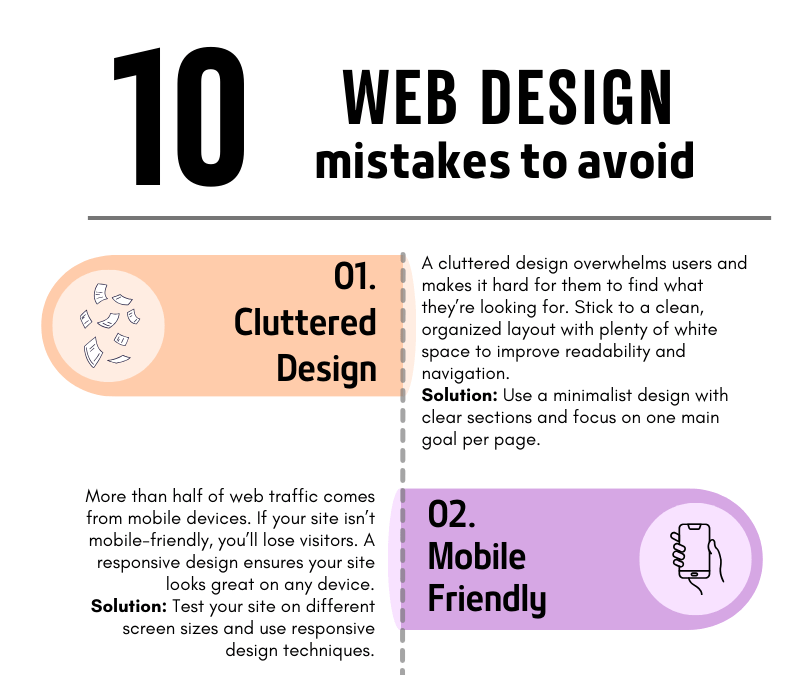
10 Common Web Design Mistakes to Avoid
Your website is often the first impression people get of your business. A poorly designed website can turn visitors away, but a well-thought-out design can convert visitors into customers. To help you build a site that stands out for all the right reasons, we’ve compiled a list of the 10 most common web design mistakes to avoid.
1. Cluttered Design
A cluttered design overwhelms users and makes navigation difficult. When visitors land on your site, they should be able to quickly find what they need without being bombarded with too much information. Less is often more!
How to fix it: Use plenty of white space, clear sections, and focus on one main goal per page. A clean and simple layout will make your site more user-friendly and visually appealing.
2. Not Mobile-Friendly
In today’s mobile-first world, having a website that doesn’t adapt to different screen sizes is a huge mistake. More than half of web traffic comes from mobile devices, so if your website isn’t responsive, you’re missing out on potential customers.
How to fix it: Test your site on various screen sizes, from mobile phones to tablets, and ensure it looks and functions well across all devices.
3. Slow Loading Speed
A slow website can frustrate visitors and drive them away before they even see your content. People expect websites to load quickly—ideally in under three seconds.
How to fix it: Compress large images, reduce the number of plugins, and use a fast, reliable hosting service. These steps can dramatically improve your site’s loading time.
4. Poor Navigation
If visitors can’t find what they’re looking for, they’ll leave. Your navigation should be simple, clear, and intuitive, helping users move around your site effortlessly.
How to fix it: Limit the number of menu items, use clear labels, and make sure every link works as expected. Always guide your visitors toward the most important content.
5. Ignoring SEO
You might have the best website in the world, but if no one can find it, it’s not doing its job. Search Engine Optimization (SEO) helps your site appear in search results, driving organic traffic.
How to fix it: Incorporate relevant keywords, create SEO-friendly titles and meta descriptions, and use image alt tags. This will help improve your rankings on search engines like Google.
6. Lack of a Clear Call-to-Action (CTA)
If your website doesn’t tell visitors what to do next, they’ll likely leave without taking action. A strong call-to-action guides users toward your goals—whether that’s signing up for a newsletter, making a purchase, or contacting you.
How to fix it: Place clear, bold CTAs on every page, encouraging users to take the next step. Be specific about what you want them to do.
7. Too Much Text
Long paragraphs and blocks of text can overwhelm readers. People scan web content quickly, so keep your text concise and to the point.
How to fix it: Break your content into smaller sections, use bullet points, and include images or icons to make the content more digestible.
8. Inconsistent Branding
Your website is an extension of your brand. If your colors, fonts, and tone of voice vary from page to page, it confuses users and makes your brand appear unprofessional.
How to fix it: Establish a brand style guide and ensure that your fonts, colors, and imagery are consistent across all pages.
9. Overuse of Pop-ups
Pop-ups can be helpful when used correctly, but too many—or ones that appear at the wrong time—can annoy visitors and cause them to leave your site.
How to fix it: Use pop-ups sparingly and ensure they don’t cover the main content too quickly. Only use them for important information, such as special offers or newsletter sign-ups.
10. Neglecting Website Maintenance
A website is never truly “finished.” Regular maintenance ensures your site stays secure, functional, and up to date. Neglecting updates can lead to broken links, security vulnerabilities, and an outdated user experience.
How to fix it: Schedule regular maintenance checks, update plugins, review content for relevancy, and ensure your site’s security is always up to par.
Final Thoughts
By avoiding these common web design mistakes, you’ll ensure that your website is not only visually appealing but also functional, easy to navigate, and optimized for both search engines and user experience. A well-designed site can make a world of difference in turning visitors into loyal customers!
If you’re ready to create a website that works for your business, avoid these pitfalls and set yourself up for success. And if you need help along the way, feel free to reach out!
Preparing your website content can be a challenging task, so here are some handy tips that can help make it easier…
1.Start by identifying your target audience and what you want to convey to them.
2. Showcase your unique personality and what sets you apart from others in your field. This can help potential clients feel more connected to you and more likely to choose your services.
3. Create a clear and concise message, and organise your content into sections that are easy to navigate. Use headings, bullet points, and images to break up text and make it more visually appealing.
4. Including client testimonials on your website can be a powerful way to build social proof and attract new clients.
5. To ensure potential clients can easily get in touch with you, prominently display a clear point of contact on your website, such as a phone number, email address, or contact form, in a visible location on every page. This will make it easy for them to reach out to you and potentially start a conversation about your services.
Finally, proofread and edit your content to ensure accuracy and readability before submitting to your web designer.